

When a school needs to reach families, the hardest part is often not writing the message. It is getting that message to the right people in a form they can actually understand and answer. FAMILIES by TalkingPoints is an education app built around that communication problem. I see it as a practical bridge between schools and households rather than a full school-management system, and that distinction matters from the first use.
The app is free, rated for Everyone, and available for devices running Android 7.0 or later. TalkingPoints has built a sizable audience around it, with more than a million installs, an average rating of 4.4 from roughly seventeen thousand ratings, and about eighteen hundred written reviews. Those figures suggest that the basic idea works for many users, but my own takeaway is more specific: it is most useful when a school already has a clear communication routine and wants to make family contact easier, more inclusive, and less dependent on scattered channels.
From a classroom update to a family response
The starting condition: important information is easy to miss
Imagine a teacher needs to tell families about a change to tomorrow’s classroom plan. In a typical school, that message might compete with email, paper notices, a general school portal, text messages, and informal group chats. A parent may see one channel regularly but ignore another. A family may also prefer a different language from the one used by the school. The result is not necessarily a lack of effort; it is a broken path between sender and recipient.
FAMILIES makes sense at the point where a school wants one recognizable place for that conversation. The app’s store summary describes it as school communication, and that is the right way to approach it. I would not install it expecting lesson planning, grades, attendance management, or a replacement for every administrative tool. I would install it to make the exchange between educators and families more direct.
That focus is valuable because communication has two different jobs. One is broadcasting information: reminders, announcements, and classroom news. The other is collecting context from home: a question, a concern, or a quick explanation about a student’s situation. A useful communication app has to support both directions. If it only sends notices, it becomes another notice board. If it encourages replies without helping the school organize them, it can create a new workload.
Setting up the first conversation
The first practical step is not simply downloading the app. The school has to establish who is communicating with whom and what kind of message belongs there. A teacher may use it for classroom-level contact, while a school office may need a broader audience. Families, in turn, need to recognize that a message from the app is part of the school’s communication process rather than an optional social feed.
This is where I would advise a simple beginning. Start with one predictable use case, such as a weekly classroom update or a short reminder that genuinely needs family attention. A narrow purpose makes it easier for teachers to build a habit and for parents to understand when checking the app is worthwhile. Launching it as an additional place for every possible announcement risks making the communication landscape even more confusing.
The current version is 4.2613.0, and the app was released on February 8, 2018. Those details are useful context for expectations: this is an established education product, not a brand-new experiment. Even so, an established app can feel unfamiliar if a school has not explained the handoff clearly. A short orientation—where to look, how to respond, and which matters still require a phone call or formal school process—can prevent many avoidable misunderstandings.
The step-by-step flow for a normal school message
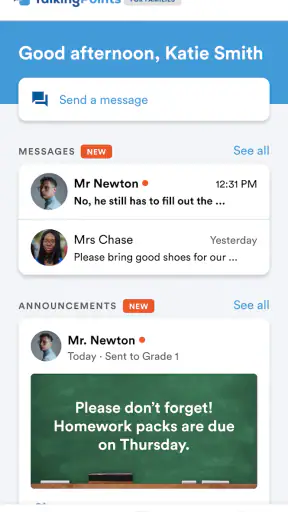
In a realistic workflow, the teacher begins with the event or information that needs to move beyond the classroom. The teacher then prepares a message with enough context for a family to act on it. “Bring materials tomorrow” is less useful than explaining which materials are needed and why. The app can make delivery more organized, but it cannot rescue a vague message.
Next comes the audience decision. The message may be appropriate for an entire class, a smaller group, or one household. This is one of the most important judgment calls in school communication. A broad message saves effort but can overwhelm families with information that does not concern them. A narrow message is more relevant but requires better organization from the sender. I would encourage teachers to pause before sending and ask whether every recipient needs the same information.
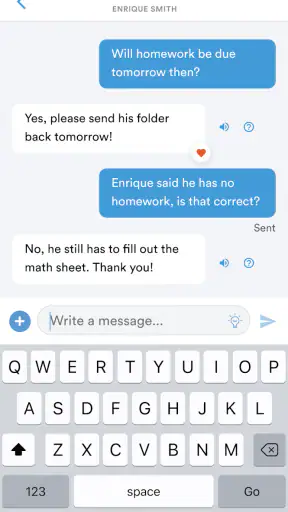
After sending, the family’s role begins. A parent or guardian reads the update, considers whether a response is needed, and replies through the same communication path when appropriate. This is a meaningful improvement over a paper note that can disappear in a backpack or an email thread that gets buried. The value is not just digital delivery; it is the possibility of a visible exchange that keeps the original context attached to the response.
For multilingual households, the central benefit is easier participation across language differences. A family should not have to choose between staying silent and writing a response they are uncomfortable composing. In practice, I would still keep messages plain and avoid idioms, abbreviations, or school-specific shorthand. Clear writing helps everyone, including families who are reading quickly on a phone.
One useful habit is to separate information from a request. A teacher can first explain what happened, then state what the family needs to know, and finally say whether a reply is expected. This reduces the common problem where a parent reads a message but cannot tell whether the school is asking for confirmation. It also makes later follow-up easier because the intended outcome was clear from the start.
Handoffs between teacher, family, and school
The handoff is where many communication tools either prove their worth or create friction. A teacher may send the original update, but the family’s reply could reveal an issue that belongs with a counselor, administrator, or office staff member. FAMILIES can serve as the first contact point, but schools still need a human process for deciding what happens after a reply arrives.
I would not treat every response as a routine inbox item. A simple confirmation can be handled quickly. A concern about learning, attendance, safety, or a family circumstance may require a private conversation through a more suitable channel. The app can help start that exchange, but it should not encourage staff to handle sensitive or complex matters casually inside a busy message stream.
There is also a handoff in the opposite direction. Families may assume that a teacher sees every message immediately. Schools should set realistic expectations about response times and urgent situations. If a matter cannot wait, the family needs to know the appropriate alternative. This is not a weakness unique to FAMILIES; it is a basic limitation of asynchronous communication that becomes more noticeable when people mistake messaging for live support.
Another practical issue is staff continuity. If a teacher changes classes, takes leave, or moves to another role, the school must decide how communication responsibility transfers. A family-facing app works best when the school—not just one enthusiastic teacher—owns the process. Without that ownership, families may receive inconsistent messages or wonder where to continue a conversation.
For a school leader, I would define three internal rules before expanding use: which messages belong in the app, who monitors replies, and how unresolved conversations are escalated. These rules are more important than sending a large volume of updates. They turn the app from a convenient outlet into a dependable workflow.
The result: less guessing, better continuity
When the process is handled carefully, the outcome is not merely that a message arrives. The family has a clearer opportunity to understand what is happening and respond in context. The teacher can communicate without recreating the same explanation across several channels. The school gains a more consistent path for everyday contact.
I especially like the potential benefit for families who have previously felt excluded by school communication. A parent who is not comfortable with the school’s main language may be more willing to ask a question when the communication process feels approachable. That can lead to earlier clarification instead of silence, missed expectations, or a problem that grows unnoticed.
There is a less obvious benefit for teachers as well: better message discipline. Because a digital conversation can be revisited, teachers have a reason to make the original update complete and specific. Over time, that can improve the quality of communication even when the topic is ordinary. The app does not automatically create that improvement, but its conversational format supports it.
For families, the result depends on consistency. If one teacher uses the app for meaningful updates while another sends occasional, unclear notes, the experience will feel uneven. I would judge the school’s implementation as much as the application itself. A well-defined routine can make a modest tool feel genuinely helpful; a disorganized routine can make any platform frustrating.
Compared with email, the strongest advantage is focus. Email is flexible, but school messages can disappear among work, shopping, and personal correspondence. Compared with paper notices, an app-based conversation is easier to revisit and respond to. Compared with a general school portal, a family communication tool may feel more immediate and personal, although a portal is usually better for formal records, schedules, documents, and administrative tasks.
That comparison also shows where FAMILIES should not be the only solution. If your main need is a complete academic dashboard, centralized document storage, or detailed school administration, a dedicated portal may be the better primary tool. If you need urgent real-time contact, a phone call or established emergency process is more appropriate. I see this app as the communication layer between those systems, not a substitute for all of them.
Where the flow breaks in everyday use
The first weak point is notification fatigue. Once families receive too many minor updates, even important messages can lose their urgency. The fix is editorial rather than technical: combine related information, reserve messages for useful developments, and state clearly when no reply is needed. A school that sends fewer, better updates will probably get more attention than one that sends everything.
The second weak point is unequal access to the communication routine. A free app removes one obvious barrier, but families still need a compatible device, reliable connectivity, and enough confidence to use the channel. Schools should avoid assuming that a missed message means a family is uninterested. For important matters, an alternative contact method remains necessary.
Language support can improve access, but it does not eliminate the need for care. Short translated messages may still be misunderstood when they contain ambiguous dates, local expressions, or instructions that depend on school customs. I would write the source message in plain language, use concrete times and actions, and invite the family to ask for clarification rather than treating translation as the end of the process.
There is also a risk of turning every family interaction into a written record that staff feel pressured to answer perfectly. Teachers may hesitate to communicate if they believe every short exchange requires a long response. A healthier workflow distinguishes quick acknowledgments from conversations that deserve a scheduled meeting. The app is most effective when it lowers the effort of starting contact, not when it creates an expectation of unlimited availability.
Privacy and judgment matter in group communication too. A teacher should think carefully before sharing information that belongs only to one household. Even when a message seems harmless, the audience should match the sensitivity of the subject. The safest habit is to keep class-wide messages general and move individual concerns into a direct conversation.
Who will get the most from it
I would recommend FAMILIES to schools that want a clearer family-contact routine, especially where language differences or scattered communication channels make participation difficult. It is also a sensible option for teachers who need to send regular classroom updates without relying entirely on paper or ordinary email.
It may suit families who want a straightforward way to receive school information and ask follow-up questions. The free price is helpful for broad adoption, and the Everyone age rating makes it approachable as a family communication tool. Still, “free” does not mean frictionless: the school must actively use it, and the family must know when and why to check it.
I would skip it as a primary choice if your school already has a well-run portal that handles family messaging, records, documents, and notifications in one coherent place. Adding another app in that situation could create duplication. I would also look elsewhere—or use another channel alongside it—if your priority is live emergency communication, detailed academic tracking, or complex case management.
My final view is favorable, with one condition: treat FAMILIES as a workflow, not merely a download. Its strength is the path from classroom information to family understanding and back again. TalkingPoints has created an approachable education app for that specific exchange, and the strong adoption and user response reflect its usefulness. But the outcome depends on thoughtful messages, clear handoffs, and a school-wide agreement about what happens after someone presses send.
For a school trying to make everyday communication more reachable, I would give it a serious trial with one class or one recurring message type before expanding. That approach exposes the real friction—unclear ownership, excessive notifications, missed replies, or confusing expectations—without disrupting every communication channel at once. If those issues are managed, FAMILIES is a practical way to turn one-way school notices into a more usable conversation with the people who support learning at home.


